“Download today and take control of your finances!”
It's an easy line to put at the end of a product video. In the draft we'll examine below, it has nothing to do with the thirty seconds before it. The video shows six features in passing. The viewer sees no problem they recognize and no single thing change on screen. Then the script asks them for a download, which is a fairly large favor from a stranger.
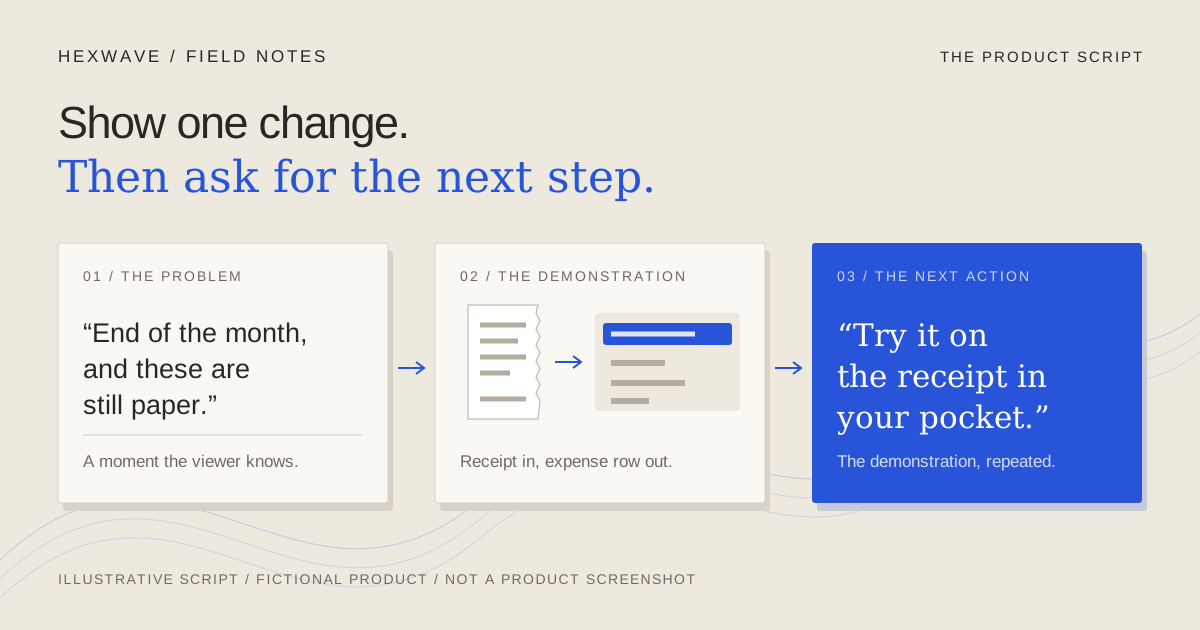
A short-form product script works when three parts connect: a problem the right viewer recognizes, a demonstration that resolves it on screen, and a next action that lets the viewer repeat that demonstration themselves. If the closing line follows from what the video just showed, it doesn't need exclamation marks. If it doesn't, no amount of urgency will repair it.
Below is a script template you can copy, followed by one worked example carried all the way through: a feature-heavy draft, a focused rewrite, the edits for pauses, captions and what the screen already explains, then a founder-voiceover version and a text-only version. The product is an invented receipts app. Every product fact, line and timing in this article is illustrative. None of it is a tested performance result.
The script template
A script for a product video has more columns than a script for a speech. The picture carries much of the meaning, so you plan what is seen, heard and read together. Use one row per beat; add rows when a beat needs more than one shot.
PRODUCT SCRIPT WORKSHEET

Viewer and moment:            Who is watching, and when do they feel the problem?
Fact this post demonstrates:  One confirmed product behavior, with its source.
Not claimed in this post:     Results, speeds or features you are leaving out.
The visible change:           Before state -> after state, as it appears on screen.
Next action:                  The smallest step that repeats the change for the viewer.
  Available on:               Which plan or price makes that step possible?
  Route per destination:      TikTok / Instagram / YouTube: where does the viewer go?

BEAT           | PICTURE | VOICE | ON-SCREEN TEXT | HOLD
Problem        |         |       |                |
Demonstration  |         |       |                |
Result         |         |       |                |
Next action    |         |       |                |

Checks before recording:
[ ] Read the voice aloud over the rough footage. Time: ___ s
[ ] Watch once on mute. Is the change still clear?
[ ] Every line matches a confirmed fact.
[ ] The next action exists, at the stated cost, on each destination.
The first block is planning, and it comes first on purpose. A script can fail before anyone writes a line, because nobody chose the one change the video will show. If you already use a short-form content brief, the top half of this worksheet will be mostly filled in by it.
The fictional product and the first draft
Here are the confirmed facts for our illustrative product, a receipts app for freelancers. We'll call it [App name] in the scripts.
| Confirmed (for this exercise) | Not established |
|---|---|
| A photo of a paper receipt creates a draft expense row with the merchant, date and total filled in. | How accurately it reads receipts |
| Every field in the draft row can be edited before saving. | How much time it saves anyone |
| A month of saved expenses exports as one CSV file. | Any effect on taxes or accountant fees |
| Scanning and CSV export are included on the free plan. | That users never lose receipts |
| Also available: mileage log, multiple currencies, forwarded email receipts, bank import and team approvals (paid). | How any of those features perform |
Now the kind of draft that gets written when the product team wants every feature represented.
Draft A: the feature tour (illustrative)
| Beat | Picture | Voice | On-screen text |
|---|---|---|---|
| 1 | Logo animates over the dashboard | “Meet [App name], the all-in-one expense app for freelancers.” | ALL-IN-ONE EXPENSE APP |
| 2 | Quick cuts through six feature screens | “Scan receipts in seconds with AI, log your mileage, track spending in any currency, import transactions straight from your bank, forward email receipts and get team approvals.” | SCAN · MILEAGE · CURRENCY · BANK · EMAIL · TEAMS |
| 3 | Smiling stock-style shot at a laptop | “It's the smartest way to stay organized, save hours every month and never lose a receipt again.” | SAVE HOURS |
| 4 | Logo and download badges | “Tax season, solved. Download [App name] today and take control of your finances!” | TAX SEASON SOLVED |
What goes wrong:
- No viewer appears. Nothing in the script shows a moment someone would recognize. “For freelancers” labels an audience without showing their problem.
- Six features, zero demonstrations. Beat 2 names six capabilities in one breath. Each would need its own shot, so the montage gives each one a glimpse that's too short to read. The viewer hears a list and sees a blur.
- Unsupported claims. “In seconds,” “save hours,” “never lose a receipt” and “tax season, solved” aren't in the fact sheet. Neither is “smartest.” These lines have to come out whatever happens to the rest of the script.
- A call to action with nothing behind it. The closing line asks for a download in exchange for a promise the video never showed. It also says nothing about cost, even though the free plan is the most useful fact for a first try.
Draft A isn't foolish. Every feature on that list is real, and someone worked hard on each of them. The problem is that it answers “what does the app do?” when the viewer's actual question is closer to “why should I watch this?”
Choose the one change the video will show
Before rewriting any lines, pick the demonstration. For each feature, ask three questions: does a specific viewer feel this problem at a recognizable moment, can the change be seen on a phone screen, and can the viewer try it at the cost you'll state?
Scanning a paper receipt passes all three. The moment is the end of the month, with paper receipts still unrecorded. The change is visible: a crumpled receipt becomes a row with fields in it. And the free plan covers both scanning and export, so the closing line can ask for something that costs the viewer nothing but one photo.
Bank import fails the third test because it's a paid feature, and team approvals fail the first for a solo freelancer. Mileage and multiple currencies are perfectly good subjects for their own posts. Moving them out of this script doesn't delete them; it gives each a video where it can be shown properly.
The rewrite
Draft B: one receipt, start to finish (illustrative)
| Beat | Picture | Voice | On-screen text | Hold |
|---|---|---|---|---|
| Problem | A hand tips an envelope of paper receipts onto a desk beside a laptop showing an empty spreadsheet titled “October expenses” | “End of the month, and these are still paper.” | October's receipts → one spreadsheet | — |
| Demonstration | A phone photographs one café receipt; a draft row appears with merchant, date and total | “Take a photo of one. It fills in the merchant, the date and the total.” | — | Hold on the filled row |
| Demonstration | The merchant field reads “Café Group 14 LLC”; a thumb renames it “Corner Café” | “That's the parent company. Rename it to something you'll recognize.” | — | — |
| Result | Month view → Export CSV → the file opens with every row | “When the month's done, export everything as one CSV.” | — | Hold on the opened file |
| Next action | Back to the pile of receipts on the desk | “Scanning and export are on the free plan. Try it on the receipt in your pocket.” | Free plan: scan + CSV export | — |
Why each line is there:
- The problem line names a moment, not a category. “End of the month” and a pile of paper do the work that “for freelancers” couldn't. Someone who doesn't keep paper receipts will scroll past, and that's acceptable: they weren't going to try this anyway.
- The demonstration states what the app does, not how well. “It fills in the merchant, the date and the total” is in the fact sheet. Speed and accuracy aren't, so the script doesn't claim them.
- The rename shows review instead of perfection. A printed parent-company name is a common, harmless mismatch. Correcting it shows the edit is possible without staging a reading error or pretending the app never needs checking.
- The result is the thing the viewer wanted at the start. The video opened with an empty spreadsheet and ends with a filled file. That symmetry is what makes the closing line feel like a continuation instead of a pitch.
- The call to action repeats the demonstration. “Try it on the receipt in your pocket” asks for one photo, mentions the free plan because it's true and useful, and refers back to the pile the viewer has just watched. It earns its place because the previous four beats set it up.
The voice track is 59 words, against 66 in Draft A. The word count isn't the point, though. Draft B is clearer because each sentence points at something the viewer can see.
Notice what Draft B gave up: the product's breadth, the logo intro and any claim about saving time. If the business needs people to know about mileage tracking, that's a separate post with its own problem, demonstration and next action.
Write the pauses into the script
A script read aloud at a desk leaves out the time the footage needs. In Draft B, the viewer needs time to read the filled row and the opened spreadsheet. If the voice runs straight through those moments, the viewer has to choose between listening and looking.
That's why the template has a Hold column. Mark the beats where the picture needs to stay on screen without new speech, then write the voice around them. Draft B has two: one where the change happens and one where the result appears. If every beat has a hold, the video drags; if none does, the result flashes past.
Don't publish a timing estimate you haven't measured. Read the voice track aloud over a rough cut of the footage and time it. A desk read can't show you where the screen needs extra time; a read over the real recording can. The timing you get is your actual draft length. Treat any seconds-per-beat chart, including one you write yourself, as a starting guess until then.
When the read runs long, cut words before cutting holds. The holds are where the demonstration lands.
Let the screen, text and captions split the work
An earlier version of Draft B's second beat read: “Tap the camera button at the bottom, line up the receipt and tap capture. It fills in the merchant, the date and the total.” The first sentence describes exactly what the viewer is watching. It was removed. The second sentence stays because it tells the viewer where to look, and because naming the three fields is the claim the video is making.
Use this as your general rule: narrate what the picture can't explain, and stay quiet about what it can. The product demo guide covers how to record footage that carries its own explanation. In the script, the job is to avoid saying it twice.
On-screen text and captions are different tools, and a product script needs to plan both. Instagram's Reels guide makes the distinction directly: text overlays highlight moments you choose, while captions make the whole spoken audio visible. It recommends captions for people watching without sound or who are deaf or hard of hearing, and describes the text in a reel's first frame as its headline.
So Draft B uses two overlays and leaves every other beat clear. The opening overlay, “October's receipts → one spreadsheet,” lets a muted viewer understand the problem before the demonstration begins. The closing overlay puts the plan condition on screen, where it can be checked, rather than only in the voice. Captions carry everything else.
Two checks follow from that:
- Review automatic captions against the script. YouTube's captioning help says automatic captions are published by default when available and that their quality varies. Its instruction is sensible for any app that transcribes your voice: review them and fix mistakes. Check the product name first. An invented brand name isn't an ordinary word, so don't assume a transcript will spell it the way you do.
- Keep captions off the demonstration. In Draft B, the merchant field is where the change happens. If the caption sits on top of it during the rename, the viewer reads about the edit and misses it. Check placement at phone size on each app before posting.
Make the call to action match where the viewer is
A call to action has to be possible, not just relevant. “Try it on the receipt in your pocket” assumes the viewer can find the app. That route differs by destination, so the script's last line and the post's caption need to agree with it.
YouTube's link-sharing help says URLs in Shorts descriptions and comments aren't clickable; channel profile links and related-video links are the clickable options it lists. So a Shorts caption reading “link below” sends the viewer nowhere. For TikTok and Instagram, check the link options available on your actual account before writing the instruction. The cross-platform publishing guide walks through checking each route.
When the action isn't available, change the action rather than bluffing. Some options for when you can't offer a free try:
| Situation | Honest next action | Why it still connects |
|---|---|---|
| Free plan covers the demonstrated feature | “Try it on one receipt.” | Repeats the demonstration exactly |
| Feature is paid, with a free trial | “The trial includes [feature]. Try it on [one small real task].” | Names the condition, then the smallest step |
| No product access yet (waitlist) | “We're letting people in by invitation. The link in our profile is the list.” | Doesn't imply something can be used today |
| The post teaches a method, not the product | “Next month, photograph each receipt the day you get it.” | Gives a useful action that doesn't depend on buying |
The last row matters more than it looks. A script can earn trust by asking for nothing commercial at all, especially when the post is answering a question rather than demonstrating a feature.
Version two: the founder voiceover
A founder narrating their own product can say something the brand voice can't: why the product works the way it does. That's useful when it's true and dangerous when it's decoration. The square brackets below are where your real reason goes. If you don't have one, use Draft B.
Draft C: founder voiceover (illustrative; the bracketed line must come from the founder's real experience)
| Beat | Picture | Voice |
|---|---|---|
| Problem | Same envelope of receipts, same empty spreadsheet | “[Your real reason, e.g. ‘I used to retype these from my jacket pockets every month.’] So this is what I built.” |
| Demonstration | Photo of one receipt; draft row appears | “One photo. Merchant, date, total.” |
| Demonstration | Rename “Café Group 14 LLC” to “Corner Café” | “It reads the name that's printed, which isn't always the name you know. So you can change it.” |
| Result | Export CSV; file opens | “At the end of the month, it's one CSV.” |
| Next action | Back to the pile | “Scanning and export are free. Try it on whatever's in your pocket.” |
What changes from Draft B:
- The opening becomes a reason, not just a situation. It only works if the founder can say it without inventing anything. A borrowed origin story is a fabricated testimonial with the founder's face on it.
- The founder explains a limitation in their own words. “It reads the name that's printed” is more candid than a brand voice usually allows, and it explains the edit before the viewer wonders about it.
- Shorter sentences. A person talking over their own screen speaks less formally. Write it the way they talk, then have them read it aloud before recording and replace every phrase they stumble over.
A founder version doesn't need the founder on camera. The voice can run over the same screen recording. If they do appear, keep the demonstration footage in the frame long enough to be read; a talking head shouldn't replace the evidence.
Version three: the text-led post
Some posts carry no voice at all: on-screen text over the footage, with music or the ambient sound of the recording. The script becomes a sequence of text cards, and each card has to make sense on its own because the viewer might read only some of them.
Draft D: text-led (illustrative)
| Card | Picture | On-screen text | Hold |
|---|---|---|---|
| 1 | Envelope of receipts, empty spreadsheet | October's receipts are still paper. | Long enough to read twice |
| 2 | Photo of one receipt; the row fills | Photo → merchant, date, total | Until the row is complete |
| 3 | Rename the merchant field | Rename what you won't recognize later | Through the edit |
| 4 | Export; file opens | Month end: one CSV | On the opened file |
| 5 | Back to the pile | Free plan: scan + CSV export. Try one receipt. | Long enough to read twice |
Post caption: “Paper receipts → expense rows → one CSV. Scanning and export are on the free plan.” Then the link instruction that matches the destination.
What changes from Draft B:
- Fewer words per beat. A card competes with the footage for the viewer's eyes, so it carries only the noun or action needed to read the picture.
- The hold is set by reading, not narration. “Long enough to read twice” is a house rule for drafting, not a platform standard. Check it with someone who hasn't seen the script.
- Cards sit away from the action. Card 3 must not cover the merchant field it's describing.
- The caption takes on the explanation. With no voice, the post's written caption is the only place to repeat the plan condition and give the route.
If you're making the text-led version from still images rather than screen recording, the slideshow guide covers writing the slide sequence before designing it, and choosing between a photo post and a rendered video.
Check the script before anyone records
Run these against your own worksheet. Each catches a failure from Draft A:
- Can you point to the visible change? Name the before frame and the after frame. If you can't, the script is still a feature list.
- Does every spoken and written line trace to a confirmed fact? Delete or rewrite any line that doesn't, however good it sounds. The AI content review guide covers this check in more detail if a tool drafted your lines.
- Does the last line repeat the demonstration for the viewer? It should name a step they can take, at the cost you state, through a route that exists on that destination.
- Did you time a read over the real footage? If not, your timing is a guess.
- Does it work on mute? Watch the rough cut with the sound off. The first-frame text and the demonstration should still explain the problem and the change.
Then fill in the worksheet for a single feature and write only the problem line and the last line. If the last line doesn't follow from the problem through something you can show, change the demonstration before you polish the hook. The hooks guide can help with the opening once the rest of the script is settled.
Sources & reference material
- How to make Instagram Reels: the complete 2026 guide — Instagram, checked October 14, 2026. Official guide. Distinguishes text overlays (moments the creator chooses) from captions (the whole spoken audio), recommends captions for viewers watching without sound or who are deaf or hard of hearing, and treats first-frame text as the reel's headline. Gives a 3-second to 3-minute length range. It does not establish that any script structure improves reach or conversion.
- Use automatic captioning — YouTube Help, checked October 14, 2026. Covers long-form videos and Shorts. Says available automatic captions are published automatically, quality may vary, and creators should review and edit them. Says nothing about which words are most often mistranscribed.
- Share links on YouTube — YouTube Help, checked October 14, 2026. States that URLs in Shorts descriptions and comments are non-clickable, and lists channel profile links and related-video links as clickable options. Used only for the YouTube call-to-action route; it does not cover TikTok or Instagram.