“Make a quick video showing how easy it is to use.”
Imagine handing that instruction to an editor on Monday. On Wednesday, you get a polished tour of your dashboard. The transitions look good. The music fits. Unfortunately, the thing you wanted people to notice happens in a tiny corner of the screen, just before the logo.
The editor made a reasonable guess. You'd left the important decision to them.
A short-form content brief should settle that decision before production: who needs to see this, what should they understand, and what will you show them so they can understand it? Then it gives the person making the post enough detail to do the work.
Below is a copyable template, followed by two completed examples. We'll build the software example from product facts to a shot list, then adapt the method for a physical product. Both products are fictional; the examples demonstrate planning choices, not results from campaigns.
The short-form content brief template
Use one brief per post. Keep it in the same folder as the footage or recording it refers to, so the person editing can find both.
| Field | What to write |
|---|---|
| Viewer and situation | Who is watching, and what are they trying to do? |
| One takeaway | What should they understand after watching? |
| Verified claim | The exact product behavior or fact you can support, with its source. |
| Proof asset | The recording, photograph or demonstration that will show it. Include a file link or name who will capture it. |
| Opening frame and line | What appears first, and what the viewer reads or hears. |
| Sequence | What happens next, including the details the editor must preserve. |
| Caption and next action | The accompanying text, the requested action and the destination that makes it possible. |
| Production and review | Channel, format, assets, limitations, person making it, deadline and final approver. |
You can paste the file into a document, a task or a notes app. There's no email form. Leave a field marked “missing” if it isn't settled yet; that tells you what to resolve before recording.
This is a brief for an individual post. A campaign with several creators may also need contracts, usage permissions, budgets and delivery terms. Here, we're answering a smaller question: could someone make this particular video without having to guess what you meant?
Start with the product fact you can show
For our first example, imagine a contact-import tool with these capabilities:
- It accepts a CSV file.
- Its preview highlights rows with a missing email address.
- The user can go back to the source file, fill in the missing address and upload it again.
That's our source material. We haven't established that it finds every kind of error, removes duplicates or saves a particular amount of time.
The vague brief would be: “Show how our tool takes the pain out of managing contacts.” You could make almost anything from that sentence. A dashboard tour would qualify. So would a founder talking over stock footage of an exhausted office worker.
Let's make the choice narrower. The viewer is a small business owner importing an event contact list. The situation is specific: they're about to upload a spreadsheet and haven't noticed an empty email cell. The takeaway is that they can see which contact needs attention in the import preview.
Now the claim has an obvious demonstration. Prepare a CSV containing invented contacts, leave one email cell empty, upload it and record the highlighted row. That recording is the center of the post.
There is a boundary here worth putting in the brief: the tool flags the missing address; the user supplies the correction. An editor could easily cut away the manual step and accidentally suggest that the product found the address itself. Recording the full sequence gives them a way to tell the story accurately.
For your own product, attach the current source for each claim: a working demo, a specification or an approved product page. If the page says “effortless,” keep looking for the behavior behind the adjective. What exactly happens when someone uses it?
If you're starting with a page full of features, the guide to turning a product URL into content ideas helps separate those facts into individual post ideas. Pick one of them for this brief.
Let the demonstration shape the hook
Now we can write an opening without asking the product to do something it can't.
Consider these options for the fictional import tool:
| Opening | What it asks the video to deliver |
|---|---|
| “Never lose a lead again.” | A guarantee that extends far beyond a missing email warning. Drop it. |
| “Clean your whole contact list in one click.” | Automatic correction and comprehensive cleanup. Neither is in our product facts. |
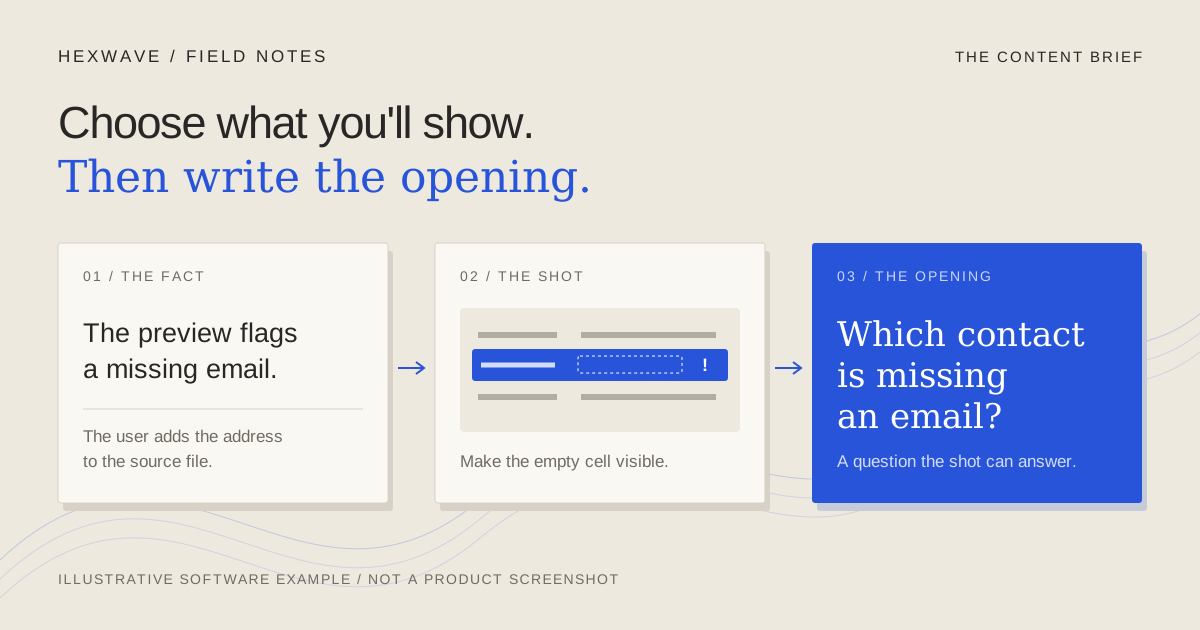
| “Which contact is missing an email?” | A small question the highlighted row can answer on screen. Use it. |
The third opening gives the viewer a task. Put a short, legible contact list on screen and let them look for the gap. Then show how the import preview marks it.
This is an editorial choice, not a prediction that the third line will get more views. It earns its place because we can fulfill its promise with the footage available.
Write the first image beside the first line. “Which contact is missing an email?” over a logo animation doesn't work as the same opening. The words ask the viewer to look for something the image hasn't provided.
If the relevant interface is too small at phone size, record a close crop of the rows and the warning, while leaving enough context to show what the user is doing. Check that crop before recording the entire walkthrough. Beautiful desktop footage can become unreadable once it lives inside a vertical frame.
Turn the idea into a sequence an editor can follow
TikTok's advertising guide uses a hook, body and close structure. It's a useful way to organize a brief, although that ad guidance doesn't establish how this organic post will perform.
For this example, we need to specify what belongs in each part. “Show the feature” still leaves too much unanswered.
| Shot | Picture | Spoken line or overlay | Editing instruction |
|---|---|---|---|
| Opening | A short list of invented contacts, with one email cell empty. | “Which contact is missing an email?” | Keep the list readable. Don't cover the empty cell with the caption. |
| Demonstration | Upload the CSV. Show the preview highlighting the incomplete row. | “The import preview flags the gap.” | Show the upload action and resulting warning. Don't add a warning graphic the product doesn't display. |
| Correction | Fill the missing cell in the source file and upload it again. | “Add the address to your file, then upload it again.” | Preserve the manual step. Make the transition between the file and the product clear. |
| Close | The updated preview, with the example row now complete. | “Check your next CSV before you import it.” | End on the completed task. Put the product name in a readable, unobtrusive label. |
Don't assign timings before you've tried the actions. If the correction needs longer than expected, shorten the explanation around it or split the idea into two posts. Speeding through the evidence to meet an arbitrary duration defeats the point of the demonstration.
You don't need to dictate every cut, cursor movement or word to a capable creator. Identify what must survive the edit, and let them choose how to present it. In this brief, the manual correction is non-negotiable. The exact transition into the closing frame isn't.
The completed software brief
Here's the handoff version. It refers to the shot list above rather than making the editor extract instructions from the whole article.
Post: Missing email in a contact import.
Viewer: A small business owner uploading contacts collected at an event.
Takeaway: The preview identifies a row that needs an email address before the user continues.
Source: The fictional capabilities listed above. In a real brief, link the current demo or product documentation here.
Proof asset: A screen recording of upload, warning, manual correction and re-upload. Record with invented contacts only.
Opening: A readable contact list, with “Which contact is missing an email?”
Sequence: Follow the four shots in the table. Preserve the correction in the source file.
Caption: “One empty cell is easy to overlook. Here's how the import preview flags it, and where to add the missing address.”
Action: Check the next CSV before importing it. This post teaches a task; it doesn't require a website visit.
Delivery: One vertical video for an organic TikTok post. No music required. Record a clean version without platform stickers so later adaptations remain possible.
Ownership: The maker captures and edits; the product owner verifies the behavior. Put the actual people's names and an agreed delivery date in these fields before assigning the work.
Approval condition: The final video shows the manual correction, uses no real contact details and makes no automatic-cleanup claim.
Notice what we've left out: the other features, the founding story and a request to book a call. They may belong in other posts. This one is already doing a useful job.
Hexwave's planned website-to-content workflow starts with the same problem: turning product information into material you can review and use. It's in development. You can use this brief on its own today; early access is an option if you'd like to follow what we're building.
A physical product changes what you have to prove
For the second example, imagine a fictional reusable bottle with a lid that comes apart for cleaning. The team has a product sample and instructions showing which pieces can be removed by hand.
“Easy to clean” is tempting copy. But a shot of someone rinsing the outside won't tell the viewer anything about the lid. And a demonstration of removable parts doesn't establish that the bottle is dishwasher-safe or that it eliminates bacteria.
The more useful idea is to show exactly where the lid separates. That gives someone evaluating the bottle information they can inspect.
The completed physical-product brief
Post: What comes apart in the bottle lid.
Viewer: Someone choosing a reusable bottle who wants to inspect the parts they'll wash.
Takeaway: The lid separates into the pieces shown, following the care instructions.
Source: The fictional product's care instructions and sample. For a real shoot, attach the instructions for the exact model being filmed.
Proof asset: An overhead recording of the lid being taken apart and reassembled. Capture the actual sample; don't substitute a similar-looking model.
Opening: Hold the assembled lid over a plain surface. Say, “Here's what comes apart when you clean this lid.”
Sequence: Show the assembled lid; remove the permitted pieces in order; lay them where the viewer can see each one; put the lid back together. Record the removal in one continuous take, then capture close-ups if the connections are hard to see.
Caption: “A closer look at the removable parts in this bottle lid. Follow the care instructions for your model when taking it apart.”
Action: Read the model's care instructions. The publishing owner must supply and check the exact destination and the account's available route to it before adding a link instruction.
Delivery: One vertical video for Instagram Reels. Use a stable overhead setup, original narration and a surface that makes small parts visible.
Ownership: The maker films and edits; the person responsible for product care checks the removal and reassembly. Add their names and the agreed date before handoff.
Approval condition: Every removed part is meant to be removable. The order is accurate. No hygiene, cleaning-speed or dishwasher-safety claim has slipped into the narration or caption.
The software example needed a prepared demo account. This one needs a particular physical sample, the right instructions and a camera position that shows the person's hands. Those are production dependencies. Writing “product close-ups” in both briefs would hide the difference.
If you don't have the sample, mark the shoot as waiting for it. You can still draft the sequence. A rendered animation shouldn't quietly take the place of evidence about how the actual lid comes apart.
Check the brief by handing it to someone
Before scheduling a shoot, ask the maker to explain what they'll record, what they'll need and which part must remain in the final edit. Their questions are useful feedback on the document.
“Where's the demo file?” means an asset is missing. “Does this fix the address automatically?” means the claim is unclear. “Which bottle model?” means the product reference isn't specific enough. Resolve those questions in the brief, where the next person can find the answers too.
Then check the finished post against the brief. A good plan doesn't prevent an inaccurate caption or a misleading cut. The content-review guide covers that separate decision. Once several briefs are ready, the batch-production guide explains how to group their recording setups without making every post tell the same story.
For now, choose one product fact and fill in the template. Find the recording or shot that would let a viewer see it. If you can't name that shot yet, spend your next few minutes there. The opening line will be easier to write once you know what follows it.
Sources & reference material
- Creative Codes — TikTok for Business, checked October 4, 2026. The hook, body and close structure appears on page 4. This is advertising guidance, not evidence of organic performance for these examples.