A product slideshow can be useful with five photographs and a decision worth explaining. Start there. If every slide says the product is excellent, making the transitions prettier won't give the reader a reason to continue.
For a first attempt, answer one question someone could have before buying. Show the relevant detail, explain how to judge it, and finish with a next step that follows from the answer.
We'll build a five-slide example around a fictional desk tray: “Will this fit beside my keyboard?” You can borrow the sequence for your own product, using its real measurements and your own photographs.
Choose a photo post or a video before exporting.
People use “slideshow” for two different outputs. A photo post contains separate images the viewer can move through. A video slideshow plays still images along a timed sequence. An MP4 export is the second kind, even when every frame began as a photograph.
TikTok documents a distinct photo-post publishing format. That establishes the distinction; it doesn't establish that every third-party scheduler supports that format for your account. Check the actual output and publishing route before buying a slideshow tool.
Choose separate images when the reader needs time to inspect a measurement, read a short explanation or compare details. Choose a video when timing, narration or a visible action is important to the explanation. These are editorial choices, not claims that one format gets more reach.
For our desk-tray example, separate images are a sensible starting point because the viewer may want to stop on the measurements. If the question were “Does the drawer catch when you pull it?”, record the movement. A photograph can't demonstrate that motion.
Write the five-slide sequence before designing it.
For this fictional example, suppose the tray's external footprint is 24 by 10 centimeters. It is open at the top, with no drawer or lid. Those are invented specifications for the exercise. Replace them with measurements of your actual product before using this copy.
The useful outcome is a fit check the reader can perform at their own desk. Here is the whole sequence:
| Slide | Words on the slide | Photograph or diagram | What the reader learns |
|---|---|---|---|
| 1 | “Will it fit beside your keyboard?” | The real tray beside a keyboard, with the full footprint visible. | The precise question this post will answer. |
| 2 | “Measure the space you actually leave free.” | A ruler in the intended position; keep the keyboard and mouse area in frame. | Where to take the measurement. |
| 3 | “This example needs 24 × 10 cm.” | A top-down product photograph with external width and depth labeled. | The tray's footprint, without guessing from perspective. |
| 4 | “Mark that rectangle. Then use your desk.” | A paper rectangle beside the keyboard, with a hand using the mouse normally. | Whether the space stays usable during work. |
| 5 | “Check your space before choosing a size.” | The same paper rectangle and a small reminder to check the current product dimensions. | A practical next step, including the possibility that it doesn't fit. |
Five slides are enough for this explanation. There is no need to insert a dramatic warning or a teaser between the measurement and the result.
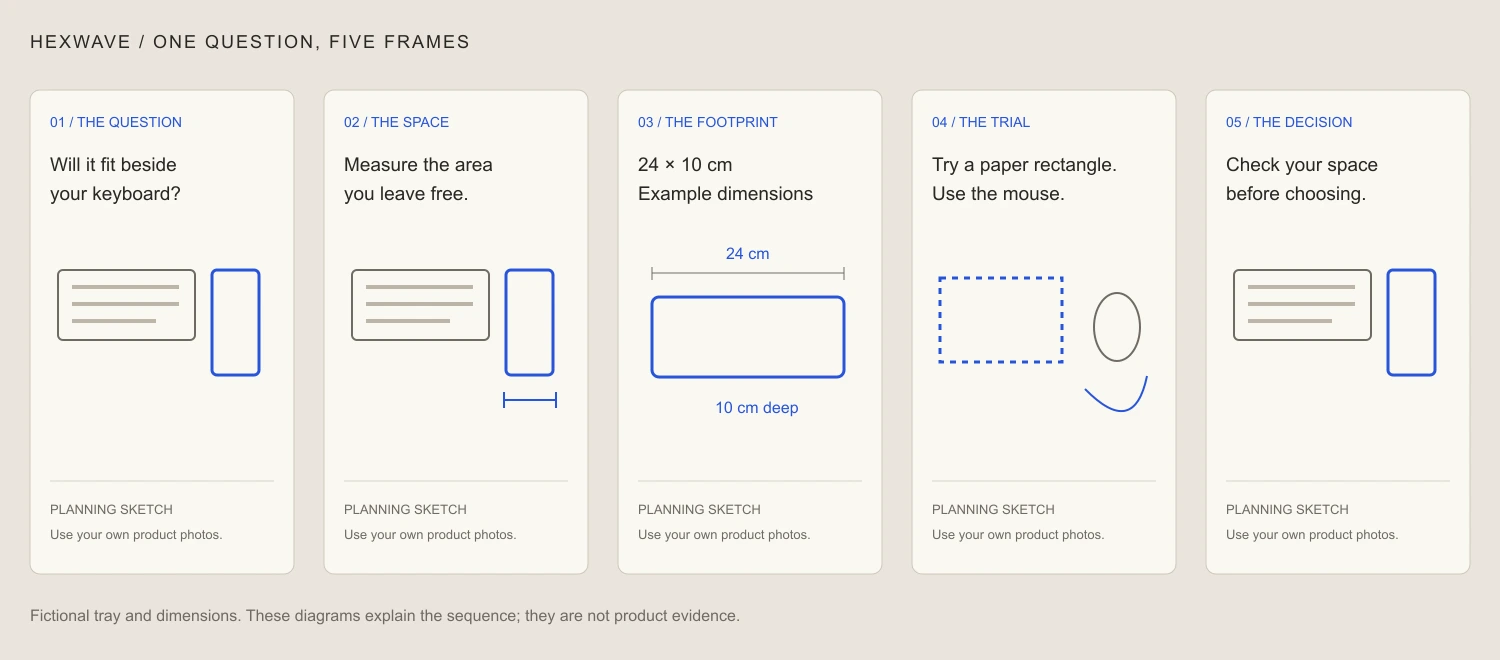
Open the annotated sequence at full size.
Download the five-slide script and export checklist ↓Make the image carry some of the explanation.
If slide three says “24 × 10 cm” above an unrelated lifestyle image, the reader still has to imagine what those dimensions mean. Put the labels beside the edges they describe. Keep the ruler or another clear reference in the original photograph where practical.
The paper rectangle is useful because the reader can recreate it. They don't need your product to check whether that footprint conflicts with their mouse movement. The advice may help someone decide against buying this size. That is a valid result for a product explanation.
Be careful with generated imagery in this kind of post. An illustrated desk can set a mood, but it cannot prove the product's size, material or real-world fit. Use your own measured sample for evidence. If the product is still a render, follow the prelaunch guide and label the stage clearly.
You can adapt the same progression to software. The question becomes “Will this import handle my file?” The sequence shows a sample input, the required columns, a clearly identified error, a correction and the resulting import. Label sample data and use the actual interface. If the steps become difficult to follow as stills, make a short demonstration instead.
Design for reading, then check in the actual preview.
Pick one headline style and one small label style. Give the key product detail room. Avoid spreading text across every empty patch of the photograph; that makes the reader hunt for the order.
A vertical canvas can be a useful design starting point. It isn't a guarantee that every pixel will stay visible in every destination or view. Keep essential words and measurements away from edges, then inspect the actual TikTok draft preview on the device and account you will use. This guide doesn't claim a universal safe-zone measurement or a verified current button sequence.
Run three checks on the exported files:
- Read each slide at ordinary phone size without zooming. If the measurement needs squinting, simplify or enlarge it.
- Look through the sequence without the caption. The question and answer should still connect.
- Ask someone unfamiliar with the product what they would measure and why. A wrong answer reveals an explanation problem that sharper type alone may not fix.
The caption can carry a material qualification, but don't use it to reverse an impression created by the slides. A visually huge tray shouldn't be “corrected” by tiny dimensions below the post. Retake the photograph or change the layout.
Keep separate files for separate publishing routes.
For a photo post, preserve the individual exported images in order. Give them simple numbered filenames so a handoff doesn't scramble the explanation. Check that the selected publishing route accepts and preserves separate photos.
For a timed video, review the duration of every frame and watch the completed export. Read the text at a normal pace. If someone needs to pause immediately to understand slide three, either give that frame more time or return to the photo-post version.
Canva's slideshow maker describes an MP4 export workflow. That can serve the timed-video version; it isn't, by itself, evidence of native TikTok photo-post publishing. The same distinction applies when any tool advertises “slideshows.” Ask what files you get and what type of post reaches the account.
For commercial audio, TikTok's Commercial Music Library guidance explains its precleared business-use library and region or placement selection. Confirm the track's permitted use for your post. Don't assume a TikTok music choice grants permission for a video exported to another platform.
Before publishing, check the image order, crop, caption, applicable commercial-content disclosures and destination account. If your scheduler requires a mobile completion step, give that step an owner. An export sitting in a folder isn't a published slideshow.
Decide whether the sequence answered its question.
After posting, keep useful questions with the original brief. “Does the measurement include the feet?” suggests a missing detail you can add. “Can you show it on a narrow desk?” suggests a second demonstration, if you have the appropriate setting.
Neither response proves the slideshow generated a sale. It does give you something concrete to improve. Record the response as it occurred and avoid inventing a conversion story around it.
For the next piece, change the buyer question rather than repeating the same five slides with a louder opening. A fit check, a cleaning explanation and an account of what comes in the box need different evidence. The product-content pillars guide can help you keep those jobs distinct, while our formats overview explains the types of content Hexwave is being built to support.
Choose the question, lay out the photographs, and read the sequence on a phone. If someone can make a better decision after the last slide, the slideshow has done useful work.
Sources & reference material
- Photo publishing format — TikTok for Developers, checked October 4, 2026.
- Slideshow maker and MP4 export — Canva, checked October 4, 2026.
- Commercial Music Library — TikTok for Business, checked October 4, 2026.