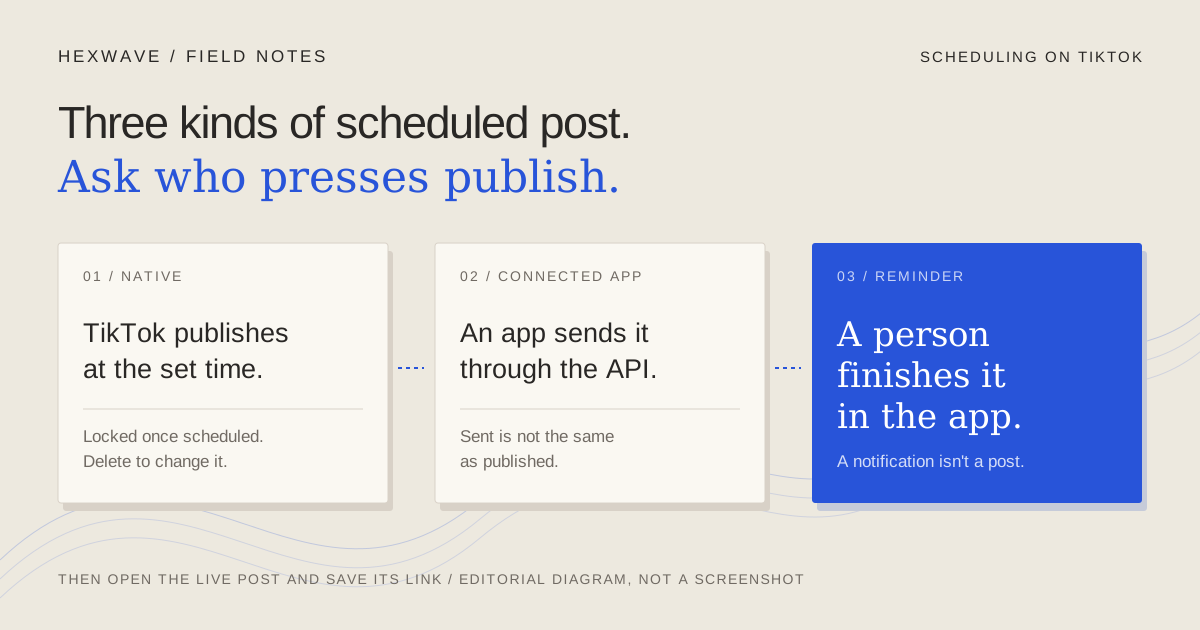
You can schedule a TikTok post in three different ways, and they don't fail in the same way.
TikTok's own scheduler holds your video and publishes it at the time you chose. A third-party tool connected through TikTok's Content Posting API holds the file itself and sends it to TikTok when the time comes. A reminder or draft flow does neither: at the scheduled time, a person gets a notification and finishes the post in the TikTok app.
All three appear under “schedule” in most guides. The difference matters at 9:00 on Thursday morning, when you want to know whether the post is live, whether something failed, or whether it's waiting on a phone in someone's bag.
This guide is built from TikTok's documentation and a small number of vendor sources, checked on 14 October 2026. We haven't scheduled a post on a live account for it, so treat the interface steps as documented, not tested. Where TikTok's sources disagree with each other or with current tutorials, the table near the end says so.
Three things called scheduling
The question that separates them is simple: who presses publish when the time arrives?
| Route | Who publishes at the scheduled time | Where the post waits | What tells you it worked |
|---|---|---|---|
| TikTok's native scheduler | TikTok | Your TikTok account, private until it goes live | The post on your profile; TikTok's 2021 announcement also describes a push notification |
| A connected app using Direct Post | The app, by sending the post to TikTok's API | The app's own servers until it sends | The app's status, which should reflect TikTok's own status report, then the post on your profile |
| A reminder or draft flow | A person, inside TikTok | A phone notification or the TikTok inbox | Only the person finishing the post; until then nothing is published |
Native scheduling is the simplest if TikTok is your only destination and the post is ready. A connected app makes more sense when the same plan covers Instagram and YouTube, or when someone other than the account owner prepares the schedule. A reminder flow is the honest choice when the post needs something only the TikTok app can add, such as a sound you intend to pick there.
Before you schedule anything
Check the account type
TikTok's 2021 Video Scheduler announcement says the feature is for “creators and Business Accounts” and, a paragraph later, that desktop scheduling needs a Business Account, which you can switch to under Settings > Account. Current third-party guides, such as Buffer's, say creator or business accounts can schedule and personal accounts can't.
We couldn't retrieve a current TikTok Help Center article that settles this on 14 October 2026. The practical test is short: open the upload page on the account you'll actually post from and look for the schedule control. If it isn't there, check the account type before you assume the feature has moved.
Switching account type can change other settings too, so read what TikTok's prompt says will change before you confirm.
Check what kind of post it is
TikTok documents more than one scheduler, and they don't cover the same posts.
- Ordinary video posts. The 2021 announcement describes scheduling videos from the web upload page. It says nothing about photo posts.
- Shoppable videos. TikTok Shop's Seller University guide, dated 27 August 2026 and marked as applying to the United States, covers a separate flow for sellers posting shoppable videos. It doesn't support private videos.
- Through the API. TikTok's Direct Post guide supports both video and photo posts. Whether a particular tool offers photo posts is up to that tool; check its own documentation.
If your post is a photo slideshow, confirm the route supports photo posts before building a week of them. The slideshow guide covers making them; this is only about getting one out on time.
Write down the time zone
TikTok's 2021 announcement says the scheduler's time zone defaults to your computer's setting. We couldn't confirm whether the current interface still works that way, so check the zone the picker shows before choosing a time.
A fictional example shows why this matters. A two-person software team wants its update demo live at 9:00 a.m. Eastern on Thursday, before a customer webinar. The founder schedules it on Tuesday evening from a laptop still set to Pacific time after a trip. If the picker uses the laptop's zone and she types 9:00, the post goes out three hours late, after the webinar it was meant to precede.
Nothing failed in that example. The scheduler did exactly what it was told, which is why it's hard to spot. Write the intended time with its zone in your plan (“Thu 9:00 ET”) and compare it with what the picker shows.
Schedule in TikTok's own tools
These steps combine TikTok's 2021 desktop announcement and the August 2026 Seller University guide. Menu names may have changed since either was written. Use them to know what to look for, not as a screen-by-screen guarantee.
- Open the upload page. In 2021 this was the web upload page at tiktok.com, reached from the upload (cloud) icon. Current tutorials describe the same step inside TikTok Studio, the creator tools TikTok lists in its Help Center.
- Upload the final file and finish everything you'd set for an immediate post. That means the caption, cover, who can view it, and comment, Duet and Stitch settings. You won't be able to fix these later (see below).
- Turn on scheduling and pick the date and time. The 2021 announcement describes a schedule toggle. The shoppable-video guide describes More options, then Advanced settings, then Schedule post, after which the Post button reads Schedule.
- Confirm the time against your plan, including the zone, then select Schedule.
- Find it again. The 2021 announcement says scheduled posts appear alongside drafts in the profile view. The shoppable-video guide says they appear on your profile with a clock icon and the scheduled time, visible only to you until they go live.
On phones, the picture is less settled. Buffer says the main TikTok app can't schedule and the separate TikTok Studio app can. A July 2025 Social Media Today report described a Schedule post option appearing in the main app's composer, based on an app researcher's observation rather than a TikTok announcement. Check your own app version before writing phone steps into a team process.
How far ahead you can schedule
This is the number most guides state with confidence, and the sources disagree.
TikTok's 2021 announcement says 15 minutes to 10 days. Buffer's current guide says 30 days, on the web and in the TikTok Studio app. TikTok Shop's August 2026 guide says 30 minutes to 30 days for shoppable videos, with up to 50 scheduled videos per account at a time.
Changing or cancelling a scheduled post
You can't edit a natively scheduled post. The 2021 announcement says the video, caption and scheduled time are locked once scheduled. The 2026 shoppable-video guide says the same and describes the fix: delete the scheduled post, choose “Delete and re-edit”, and it returns to your drafts so you can change the content or time and schedule it again.
Cancelling is the same deletion, without rescheduling. Before you delete, keep the final export and caption somewhere you can find them. Buffer's guide gives the same advice for the same reason: once a post is scheduled natively, there's no editable version to go back to.
Treat a late correction as a new post that needs the same check as the original. The review guide explains why an edit after approval needs another look at the actual final version.
Schedule through a connected app
When a third-party scheduler publishes to TikTok automatically, TikTok's documented route for it is the Content Posting API. You sign in with TikTok and approve the app's access; the app stores your video and sends it at the chosen time. Buffer's automatic publishing is one example of this kind of route.
TikTok's Direct Post documentation doesn't show a scheduling field in the request. The app must keep the file and make the call itself when the time arrives. That's our reading of the documentation, and it has a consequence: when you change a post in the app, you're changing the app's copy. Nothing reaches TikTok until the app sends it, which is how a tool like Buffer can offer edits to a scheduled post that TikTok's native scheduler doesn't.
TikTok's content sharing guidelines set rules that tell you what a compliant app should show you before it sends anything:
- The account. The posting screen must display the TikTok account's nickname, so you can see where the post will go.
- Privacy. You must choose who can view it from the options TikTok returns for your account, with no default selected.
- Interactions. Comments, Duet and Stitch must be switched on by you; none should be pre-checked.
- Commercial content. You must be able to disclose that the post promotes your own business or a third party's. TikTok labels the first “Promotional content” and the second “Paid partnership”.
- A preview, and status afterwards. Apps should show the content before posting and check TikTok's status so you can see what happened.
If a tool fills those in for you, ask why. A post to your brand's account with no privacy choice made by a person isn't what TikTok's rules describe.
Limits that belong to TikTok, not your plan
TikTok's guidelines say an app that hasn't passed TikTok's audit can only post as SELF_ONLY, visible to the account owner alone, and for at most five users in 24 hours. Before relying on a tool for public posts, ask whether its TikTok app has passed the audit. A tool in that state can “publish successfully” to a post nobody else can see.
Every app is also subject to a posting cap per creator account. TikTok says it is shared across all apps using Direct Post and is “typically around 15 posts per day”. If two tools post to the same account, they share that cap.
On audio, Buffer says its automatically published TikTok posts can only use original audio. That is Buffer's description of its own route, not a TikTok rule we could confirm, but it's a good question to ask any tool: if the post needs a sound from TikTok's library, can it be added before the scheduled time, or only in the app?
Reminder and draft flows
Some tools offer a route where they never publish to TikTok at all.
Buffer's notification publishing sends a push notification at the scheduled time. A person taps it, copies the caption, opens TikTok on the correct account, adds anything native such as music, and publishes. TikTok's API has a similar route: an app uploads the media as a draft and the creator gets an inbox notification to finish the post in TikTok.
These flows are useful when a post needs work only the app can do. Their failure is quiet. A notification on a phone that's on silent during a meeting is not publication.
Give a reminder post a named owner and a backup, and record it in your plan as “finish by hand at 9:00”, not “scheduled”. The cross-platform publishing guide has a sheet for recording which method each destination uses.
Confirm the post actually went live
A scheduled post is a plan. A published post is something you can open.
For native scheduling, TikTok's 2021 announcement says you get a push notification when the post goes live. Open the post from your profile anyway, check that it's public, and save its link with the time you saw it.
For connected apps, TikTok's status documentation explains why “sent” isn't the same as “published”:
PUBLISH_COMPLETEmeans TikTok posted it. For the draft route, it means the person finished the post in TikTok.SEND_TO_USER_INBOXmeans a draft notification was delivered. Nothing has been published yet.FAILEDcomes with a reason, such as an unsupported format, a duration outside TikTok's limits, or too many API posts to that account in 24 hours.- A public post goes through moderation before the app receives its post ID. TikTok says this usually takes under a minute and occasionally a few hours.
So a post can be accepted, processed and still not be publicly visible for a while. If the outcome is unclear, check the TikTok account and the tool's record before uploading again. A second upload made to “fix” a slow post can leave you with two copies.
Back to the fictional team: at 9:05 ET on Thursday, someone opens the account, finds the demo live and public, and pastes its link next to the plan entry. That's the whole check, and it's the step most often skipped.
What we could and couldn't verify
| Question | What the sources say | Source and date | Status on 14 Oct 2026 |
|---|---|---|---|
| Who can schedule natively | Creators and Business Accounts; desktop scheduling needs a Business Account | TikTok, July 2021 | Official but old. Current guides say creator or business. Check your account. |
| How far ahead (ordinary posts) | 15 minutes to 10 days | TikTok, July 2021 | Contradicted by Buffer (30 days). No current official figure found. |
| How far ahead (shoppable videos) | 30 minutes to 30 days; up to 50 scheduled | TikTok Shop, Aug 2026 (US) | Official and current, for TikTok Shop sellers only |
| Time zone | Defaults to the computer's setting | TikTok, July 2021 | Not confirmed for the current interface |
| Editing after scheduling | Not possible; delete and schedule again | TikTok, 2021 and Aug 2026 | Consistent across official sources |
| Private scheduled posts | Not supported for shoppable videos | TikTok Shop, Aug 2026 | Not confirmed for ordinary posts |
| Scheduling on a phone | Studio app or in-app composer | Buffer; Social Media Today, July 2025 | Not confirmed by TikTok |
| Third-party auto-publishing | Allowed via Direct Post; unaudited apps post privately; per-creator daily cap | TikTok developer docs, checked Oct 2026 | Official and current |
| Confirmation | Push notification (native); status values and moderation (API) | TikTok, 2021; developer docs | Native notification not confirmed for the current interface |
If you can open TikTok's upload page today, the date picker and account settings will answer the native questions faster than any article, including this one.
A schedule record you can check
Whatever route you pick, keep one line per post with enough detail that someone else could confirm it:
Post: Thursday update demo (fictional example) (export v04, caption approved Tue)
Account: @yourbrand (business)
Route: TikTok native scheduler
Time: Thu 9:00 ET (picker showed 9:00 ET)
Owner: Maya; backup: Sam
Change plan: delete and re-schedule; final file in /exports/v04
Confirmed: (link, time checked, public yes/no)
The last line is empty until someone fills it in from the actual account. If it's still empty at 9:30, that's your signal to look before anyone uploads again.
Hexwave's planned content calendar is being designed around this distinction: what's scheduled, what's waiting on a person, and what's confirmed. It's an early-access demonstration today, not a scheduler that posts to TikTok. For the next post you plan, choose the route by asking who presses publish, write the time with its zone, and leave the confirmation line empty until someone has opened the live post.
Sources & reference material
- Introducing Video Scheduler: Now you can plan TikTok videos in advance! — TikTok for Business, checked October 14, 2026. Official announcement published 16 July 2021. Establishes the scheduler as launched: web upload page, 15 minutes to 10 days ahead, Business Account for desktop scheduling, time zone defaulting to the computer setting, no edits after scheduling, delete and re-upload to change, push notification when live. Does not establish the current horizon, menu labels or eligibility in October 2026.
- How to Schedule Shoppable Videos — TikTok Shop Seller University (US), checked October 14, 2026. Official, dated 27 August 2026, applies to the United States. Establishes 30 minutes to 30 days, 50 scheduled videos per account, More options > Advanced settings > Schedule post, delete and re-edit to change, no private videos, clock icon on the profile. Covers shoppable videos from TikTok Shop sellers only, not ordinary posts.
- Content Sharing Guidelines — TikTok for Developers, checked October 14, 2026. Official rules for apps using Direct Post: unaudited clients limited to five posting users per 24 hours and SELF_ONLY visibility; a per-creator posting cap shared across apps, typically around 15 posts a day; required account name, privacy choice with no default, commercial-content disclosure, preview and status polling. Does not describe any particular scheduler's implementation.
- Get Started - Direct Post — TikTok for Developers, checked October 14, 2026. Official. Establishes that Direct Post publishes video or photo posts to an authorizing user's account and that content from unaudited clients is restricted to private viewing. No scheduling parameter appears in the documented request; timing is the calling app's responsibility (our reading of the documentation).
- Get Started - Upload Content — TikTok for Developers, checked October 14, 2026. Official. Establishes the draft route: an app uploads media, the creator receives an inbox notification and must finish the post in TikTok.
- Get Post Status — TikTok for Developers, checked October 14, 2026. Official status values (PROCESSING_UPLOAD, PROCESSING_DOWNLOAD, SEND_TO_USER_INBOX, PUBLISH_COMPLETE, FAILED), fail reasons, and the note that public posts pass moderation before a post ID is returned; moderation usually within a minute, sometimes a few hours.
- Query Creator Info — TikTok for Developers, checked October 14, 2026. Official, last updated 4 August 2026. Lists privacy options for public and private accounts, per-creator maximum video duration, and the errors for a reached daily posting cap.
- How to Schedule TikTok Posts (For Free): A Step-By-Step Guide — Buffer, checked October 14, 2026. Third-party vendor guide with interface screenshots. States a 30-day native limit on web and in the TikTok Studio app, creator or business accounts only, and that its auto-published TikTok posts can only use original audio. These are Buffer's statements; TikTok did not confirm them in a source we could retrieve.
- Using notification publishing — Buffer Help Center, checked October 14, 2026. Vendor documentation of a reminder route that covers TikTok: a push notification at the scheduled time, then a person finishes and publishes in the native app. Establishes one vendor's flow, not every scheduler's.
- TikTok Adds Scheduling Options in Post Composer — Social Media Today, checked October 14, 2026. Trade report from 14 July 2025 based on an app researcher's observation of a Schedule post option in the TikTok app composer. Not a TikTok confirmation; gives no eligibility or horizon.