Viraloop's homepage makes a clear promise: "Set it up once and Viraloop keeps creating and posting your content on autopilot." If you're looking for an alternative, something about that sentence stopped fitting. The useful question is which part.
Maybe the automation runs, but you want it aimed at something else. Maybe you want to make the cuts yourself. Maybe you want a real person holding your product. Or maybe your content is fine and you only need a dependable way to post it. Those are four different purchases, and the tool with the longest feature list won't necessarily solve any of them better.
This is a documentation-based comparison. We read each vendor's public product, pricing and help pages on October 14, 2026. We didn't sign up, run trials, connect accounts or judge output quality, so nothing below is a test result. Hexwave publishes this journal and is building its own product, currently in early access. It isn't ranked here, and it isn't offered as something you can switch to today. The Hexwave and Viraloop comparison covers that single-vendor question separately.
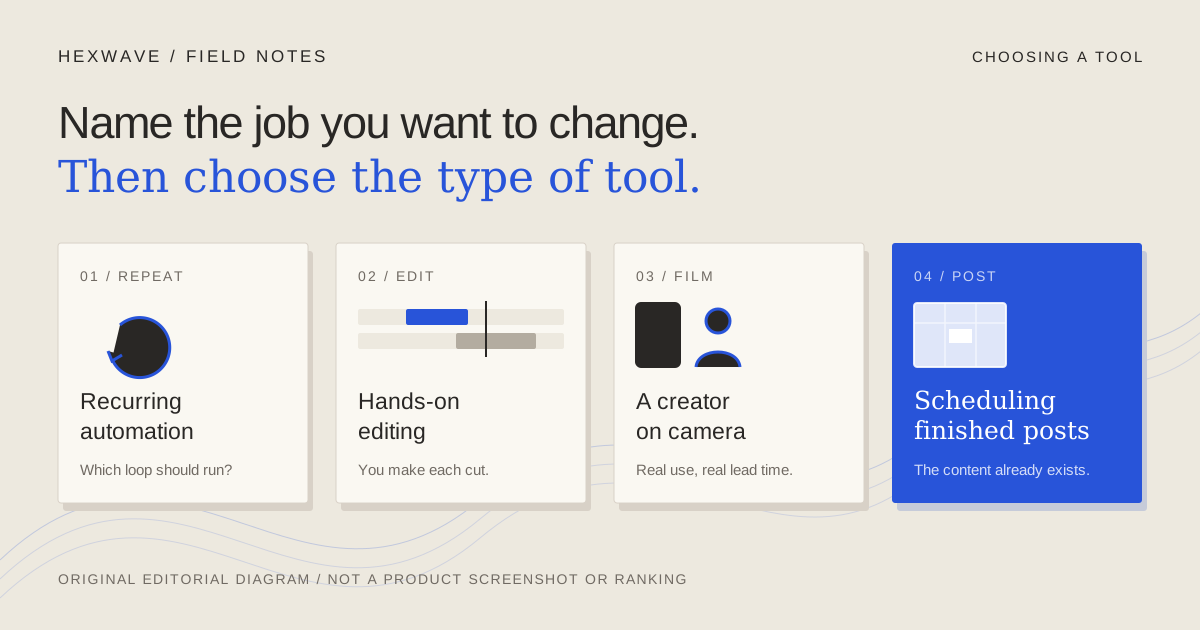
The short answer, by the job you want to change.
| What you want to change | Type of tool | Candidate we checked | What you give up, or need to verify |
|---|---|---|---|
| Keep recurring automation, but run a different loop | Another automated generator | Fastlane (ads and organic, performance loop) or Relay Studio (TikTok, approve each post) | Whether your destinations are supported, how edits work, and what still runs after you pause it. |
| Make the edit yourself | Hands-on video editor | Descript | Recurring generation. You supply ideas, footage and editing time. |
| Put a real person on camera | Creator marketplace or managed creator service | Billo | Speed and per-post cost. You ship products and write a factual brief. |
| Post content you already make | Social scheduler | Buffer | Content creation. Check automatic publishing for each account type. |
| None of the above | Stay with Viraloop | Viraloop | Fix the source facts or the review habit before blaming the tool. |
These rows are separate routes, not a ranking. Some readers will combine two, such as an editor and a scheduler. If you're starting from a long recording, a product photo folder or a blank page, the broader guide to AI tools by starting asset covers routes this article doesn't.
Check what Viraloop already does before you leave.
A surprising number of switches are made to get a feature the current tool already has. So start with what Viraloop states on its own pages.
It builds a brand profile from your website URL. Its homepage lists 20 formats, from wall-of-text and slideshows to AI talking heads, green-screen memes and character swap. One of them, Custom, accepts your own video or image. Automations let you choose formats and AI characters and set a recurring schedule. Turbo Mode presents generated batches to swipe through, and the content calendar schedules across TikTok, Instagram and YouTube. The developer page documents a REST API, a CLI, a hosted MCP server and an agent skill. Sources: Viraloop, developers.
The pricing page needs a careful read. On October 14, its plan cards listed Starter at $16 a month or $190 a year, with about 100 posts, 100 credits, two automations and five accounts. The FAQ on the same page listed Starter at $19 a month. The card figure is close to the annual price divided by twelve, so the difference may be a billing-period display, but the page doesn't say. Confirm the total at checkout. The page also states a 7-day money-back guarantee after your first payment. Source: Viraloop pricing.
Two practical consequences follow. If your complaint is "I want to edit my own footage sometimes," you may be able to edit elsewhere and bring the result back through Custom without moving your whole calendar. And if your complaint is that posts went out before you saw them, check whether you skipped the review that Viraloop says you can perform. Its homepage frames that review as available, not mandatory: you can check the day's post "if you want to."
If you want automation, but a different loop.
Recurring automation is the right type of tool when the routine is clear and someone can still inspect it. The question is what the routine should optimise for.
Fastlane describes a loop aimed at advertising as well as organic posts. Its site says it learns your brand from one URL, creates static ads and videos, then reads performance data and makes variations of what worked. It lists Meta, Instagram, TikTok and YouTube Shorts as destinations, uses a credit model, and offered a 7-day free trial with 50 credits when we checked. Source: Fastlane. That makes it a candidate if paid creative testing matters more to you than an organic posting calendar. The same page advertises a paid add-on for warmed TikTok and Instagram accounts. If you consider any account service, read the platform's own account rules first; we haven't assessed that offer.
Relay Studio goes the other direction: narrower scope, stricter gate. Its homepage says it makes slideshows and videos from your website, that you swipe to approve each post, can edit the wording first, and that "nothing goes out" unless you approve it. TikTok is the only destination it lists. On October 14, Starter was listed at $25 for the first month, then $49 a month, for 40 posts created and 20 published to TikTok. Source: Relay Studio.
So the choice is less "which tool has more" than "which default do you want." Viraloop describes automation that keeps posting unless you step in. Relay describes publishing that waits for you. Fastlane describes a loop that responds to performance data. All three are vendor descriptions; run the same brief through any candidate before you trust the description.
A useful trial for this route: set up a two-post week, then change a product fact after both posts are scheduled. Watch what happens to work already queued. Pause the automation and check that nothing else is generated or published. The Fastlane alternatives guide has a longer test brief you can reuse.
If you want your hands on the edit.
Some founders leave an automated generator for a simple reason: they know exactly what they want the video to show and they're tired of steering a machine toward it. That reader needs an editor, not a better generator.
Descript is a reasonable fit for software founders in particular. It edits video by editing the transcript, records your screen, adds captions and reformats for platforms including TikTok and YouTube. Source: Descript. A product walkthrough recorded on your own screen, trimmed by deleting sentences, is close to the job it describes. Its pricing page lists a free plan with one media hour a month and 720p, watermarked export; paid plans raise those limits. The paid figures appeared in pairs whose billing periods we couldn't confirm from the page, so check them at checkout. Source: Descript pricing.
The homepage also says you can "publish" from Descript. We didn't verify whether that means a share link or posting to a TikTok, Instagram or YouTube account. Assume you'll still need a publishing route until you confirm it.
Be honest about what you lose. An editor has no recurring calendar to fill. If Viraloop's real value to you was that posts appeared every week while you ran the company, an editor gives that time back to you as work. Canva and CapCut are common choices for this route too; we couldn't load their official pages on October 14, so they aren't assessed here.
If you want a real person on camera.
Most of Viraloop's listed video formats use AI characters or remix existing formats. A buyer may want something different: a person who actually unboxes the bottle, opens the app on their own phone, or explains why they switched. That's a creator-led purchase, and it works on a different clock.
Billo's own pricing article, dated October 9, 2026, says videos start at $99 each, with the price rising for length, format, creator tier, number of creators and extras such as extra hooks. You buy a prepaid balance that stays valid for 12 months. It states that you can request changes twice at no extra cost if they match the original brief, that licensing rights for ads and your channels are yours once you approve a video, and that your product and its shipping are not included. Source: Billo pricing. Its managed service, where Billo's team sources and briefs creators, starts at $2,000 a month. Source: Billo managed service.
The revision rule is the part to plan around. Two changes "as long as they match the original brief" means the brief carries the weight. Write down the confirmed facts, what the creator must show and what they must not claim before ordering. A creator can't fix a fact you didn't give them. The "where did this sentence come from" check in our guide to reviewing AI-generated content applies just as well to a human creator's draft.
Physical products make this route straightforward but slower, since samples have to travel. Software is easier to ship and harder to brief: the creator needs a working account and a task they can complete on camera.
If creation works and posting is the problem.
If you already produce posts you're happy with, a generator is the wrong purchase. You need a scheduler, and the useful questions are about account types rather than formats.
Buffer's pricing page lists a free plan with three channels and 10 scheduled posts per channel. Its Essentials plan was listed at $5 per channel per month billed yearly, or $60 a year per channel, with a 14-day trial on paid plans. It says TikTok business profiles and Instagram business or creator accounts get automatic publishing, Instagram personal profiles get reminder notifications only, and YouTube Shorts publish automatically. Source: Buffer pricing. Its help documentation adds that some posts, such as TikTok posts with trending audio, need notification publishing, where a person finishes the post on a phone. Source: Buffer Help.
At those listed prices, TikTok, Instagram and YouTube on Essentials would be 3 × $60 = $180 a year before any tax. That arithmetic covers posting only. Whoever makes the videos still needs time, and that cost doesn't appear on Buffer's invoice. Our cross-platform publishing guide walks through preparing one video for all three destinations.
When staying with Viraloop is the better decision.
Leaving has a cost: rebuilt brand context, new formats to learn, a new queue to watch. It's worth paying only when the reason is about the tool.
Stay, at least for now, if the problem traces back to your inputs. A product page that overstates a feature will produce overstated posts in any generator. Correct the source facts, regenerate a few posts and compare before you migrate. Stay if your team depends on Viraloop's documented API, CLI or MCP to drive content from your own scripts or agents. We didn't check every alternative's developer access, so confirm an equivalent before moving anything that a script relies on. And stay if the actual gap is a review habit. A swipe-through batch only protects you if somebody swipes.
Move without double-posting or losing files.
If you do switch, the risky part is the overlap, when two tools may both believe they own next Tuesday.
- List what's queued. For every scheduled Viraloop post, record the account, date, time zone, asset, caption and status.
- Pause automations first. Viraloop describes automations that keep creating and posting. Stop them before removing individual posts, then confirm that nothing new has appeared.
- Keep the files you need. We didn't find an export or bulk-download procedure on the pages we checked. That doesn't mean one is absent. Ask support how to retain your generated files before cancelling.
- Schedule a small batch in the new tool. Move one week, not the month. Check the first live posts on the actual platform, not just in the scheduler.
- Don't retry blindly. If a post's outcome is unclear, look at the destination account before posting it again.
- Cancel and disconnect separately. Cancelling a subscription and revoking a connected social account may be different actions. Do both deliberately.
- Note refund windows. Viraloop states a 7-day money-back period after the first payment; check the new tool's terms the same day you pay, not after the window closes.
Where Hexwave fits.
Hexwave is being built around a related idea: start from confirmed product facts, plan a month, review each post and then schedule it to TikTok, Instagram Reels and YouTube Shorts. It's in early access. You can explore the planning workflow and ask to join, but it isn't a working replacement for anything in the table above today. If you need to publish next week, choose from the options that are available now.
The decision rule.
Write one sentence: "I want to change ___." If the blank is the loop, compare automated generators with the same brief. If it's the edit, buy an editor. If it's the face, budget for creators and write the brief first. If it's the posting, buy a scheduler. If you can't fill the blank with something about the tool, fix the inputs and keep the one you have.
Sources & reference material
- Viraloop product overview — Viraloop, checked October 14, 2026. Vendor statements: URL-based brand profile, 20 listed formats including Custom upload, automations, Turbo Mode review, calendar, TikTok/Instagram/YouTube integrations. Not tested.
- Viraloop pricing — Viraloop, checked October 14, 2026. Listed prices on this date. Plan cards and the FAQ on the same page show different monthly figures. 7-day money-back guarantee stated. Not purchased.
- Viraloop developer documentation — Viraloop, checked October 14, 2026. Vendor documentation of REST API, CLI, MCP and agent skill. No content-export procedure found on this page; not tested.
- Fastlane product overview — Fastlane, checked October 14, 2026. Vendor statements: website input, ads and organic content, performance loop, listed destinations, 7-day trial with 50 credits. Not tested.
- Relay Studio product and plan overview — Relay Studio, checked October 14, 2026. Vendor statements: TikTok-only publishing, approve-before-publish review, introductory and renewal prices listed on this date. Not tested.
- Descript product overview — Descript, checked October 14, 2026. Vendor statements: text-based editing, screen recording, captions, reformatting for platforms. Publishing scope not verified. Not tested.
- Descript pricing — Descript, checked October 14, 2026. Free plan limits (1 media hour, 720p, watermark) listed on this date. Paid-plan billing labels were ambiguous in our read; not purchased.
- How Billo pricing works — Billo, checked October 14, 2026. Vendor article dated October 9, 2026: from $99 per video, prepaid balance valid 12 months, two revisions within brief, licensing after approval, product shipping not included. Not purchased.
- Billo managed service — Billo, checked October 14, 2026. Vendor statement: managed service from $2,000 per month. Not purchased.
- Buffer pricing — Buffer, checked October 14, 2026. Listed per-channel prices, free-plan limits, 14-day trial and account-type publishing support on this date. Not tested.
- Using notification publishing — Buffer Help, checked October 14, 2026. Vendor help documentation on when a post needs a manual mobile step. Not tested.