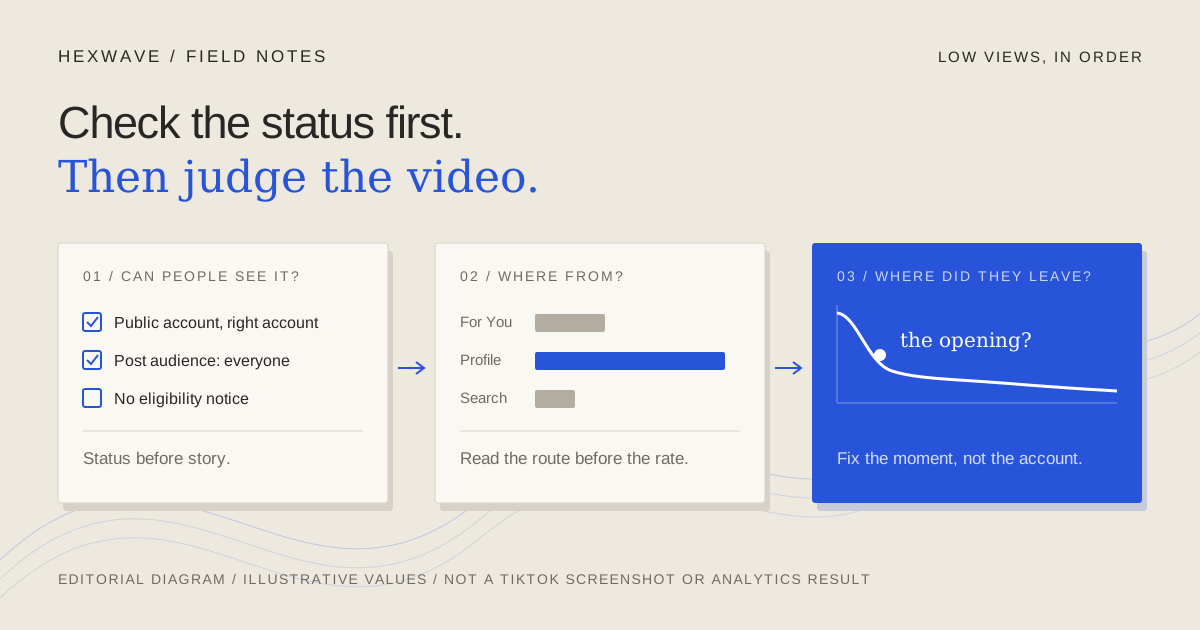
You posted a product video, and it sat there. A day later it has fewer views than a quick clip you made last month, and the comments are empty.
There are two very different explanations. Either something limited who could be shown the video, or it was shown to people and didn't hold them. The first is a status problem: privacy, eligibility, account standing. The second is a communication problem: the opening, the clarity of the demonstration, or the audience. They need different fixes. Rewriting a hook won't help a post TikTok has made ineligible for the For You feed, and appealing a restriction won't help a video that loses people before the product appears.
TikTok's own For You feed eligibility standards put it plainly: "If a video isn't getting many views, it also doesn't necessarily mean it broke a rule." So check status first: TikTok reports restrictions inside the app, and looking takes minutes. Then read the analytics to find where the video lost people.
This guide walks through that order with one illustrative product: a fictional under-desk cable tray, shown in a short install demo. The product, the post and every reading below are invented for teaching. They're not results from a real account.
Decide what "few" means before you diagnose
Compare the post with your own recent posts in a similar format, not with a viral video from someone else's account. A demo that underperforms your last three demos is worth investigating. A first post on a new account that reached few people may simply be a first post.
Follower count is a weaker explanation than it looks. In a 2020 explanation of its recommendation system, TikTok said follower count and previous high-performing videos are not direct factors in recommendations, while acknowledging that accounts with more followers are likely to get more views. That's an older document, and it doesn't describe how much anything is weighted today. It does suggest that the size of your account is the wrong place to start looking.
Also give the post time to finish processing. You can't learn much from a video that's minutes old or still being reviewed.
Step 1: Confirm people could actually see it
This sounds too obvious to bother with. Do it anyway, because it takes a minute and rules out the most embarrassing explanation.
TikTok's privacy tools page describes two separate controls. A private account means you approve who can follow you and watch your posts. Each post also has its own audience choice: everyone, friends or followers, or private. A public account can still publish a post that only a few people are allowed to see.
Check three things:
- The post went to the right account. If you run a personal account and a brand account from the same phone, confirm which one published the demo.
- The account is public, if you intend to reach people who don't follow you yet.
- The post's own audience setting is set to everyone.
If any of these is wrong, you've found the cause. Fix the setting before you read anything else into the numbers.
Step 2: Read the status TikTok reports
TikTok doesn't leave restrictions entirely invisible. Its current guidelines say that if a post is made ineligible for the For You feed or otherwise restricted, "this information will appear in the TikTok analytics tool." Open the post's analytics in TikTok Studio and look for an eligibility or restriction notice before reading any of the numbers.
Then check the account itself. In 2023, TikTok introduced an Account status page in the in-app Safety Center that shows the account's standing, according to its announcement of the updated enforcement system. In April 2024 it announced Account Check, a tool to audit the account and its last 30 posts. TikTok described it as showing whether features such as comments or messages have been restricted, and whether posts have been removed or kept from the For You feed. Menu locations move between app versions, so search the app's settings if you can't find these where you expect.
Also read your notifications. A restriction you never noticed can explain a run of quiet posts better than any theory about the algorithm.
If the app tells you a post or the account was restricted, you now have a status problem with an official reason attached. Read the reason. If you believe it's wrong, TikTok's guidelines say you can appeal, and the appeal's status appears in the Safety Center. If the reason is accurate, change the practice that caused it before you post again.
The account-level rule deserves attention from anyone posting often. TikTok's guidelines say accounts that "don't break the rules still post a lot of content that's ineligible for the FYF" may have the account and its content made "ineligible for the FYF and harder to find." One ineligible post is a post problem. A pattern of them can become an account problem.
Step 3: Check the rules product posts tend to run into
If nothing is flagged, it's still worth checking a few rules that apply directly to people selling something. These come from TikTok's current Community Guidelines, released August 25, 2026 and effective September 24, 2026.
Commercial disclosure. The guidelines say disclosure is required when you're "promoting your own business, product, or service," using TikTok's content disclosure setting. They also say that if TikTok finds commercial content that hasn't been properly disclosed, it "may reduce its visibility or apply the content disclosure setting." For a founder posting about their own product, that means checking the setting on every promotional post, not only on paid partnerships.
Reused footage. Content is ineligible for the For You feed if it "includes unoriginal or reused material without anything new." The examples include clips showing someone else's watermark or logo and minimally edited material. A manufacturer's promo clip dropped straight into your feed, or a video exported from another app with that app's watermark, is worth replacing with footage you shot.
AI-generated scenes. The guidelines require creators to label AI-generated or significantly edited content that shows realistic-looking scenes or people. Unlabeled content "may be removed, restricted, or labeled." If your demo includes a generated lifestyle scene, label it. The guide to reviewing AI-generated social content covers checking the frame itself, not just the caption.
Engagement bait. "Misleading claims meant to boost views or popularity" and "like-for-like" promises are listed as ineligible for the For You feed. A caption that promises something the video never delivers is a truth problem before it's a reach problem.
None of these checks proves why a post did badly. They remove explanations you can control before you start reading performance data.
Step 4: See where the views came from
Once the post is visible and eligible, the question changes. TikTok showed the video to some people. Which route did they take?
TikTok's Creator Academy guide to TikTok analytics says each post's analytics include traffic sources, and that the account overview shows how viewers discovered your posts and which search queries led them there. The guidelines add that a video outside the For You feed can still be found "through search or by going to a creator's account."
So read the traffic source before you read anything else about performance. In our illustrative cable-tray post, suppose almost all of the views came from the profile and from followers, with almost nothing from the For You feed. That pattern points you back to Steps 2 and 3: confirm the post is eligible, then look again at disclosure and reused footage. If the post did receive For You views and people still didn't stay, the problem is more likely in the video itself.
Search queries are worth a glance for product posts in particular. If people found the tray by searching for something like "hide cables under desk," the topic is reaching the right problem, even if the video then failed to hold them.
Step 5: Find the moment viewers left
TikTok defines three retention metrics in its analytics guide:
- Retention rate is "the percentage of your video that users watched." TikTok suggests finding the drop-off points and checking what was on screen at that moment.
- Average watch time is "the average duration viewers spent watching your content."
- Watched full video is the share of people who watched until the last few seconds. TikTok notes that this number "can also fluctuate depending on the total time of your video."
That last caveat matters. A 40-second demo and a 9-second demo shouldn't be compared on finish rate alone. Compare a post with others of similar length, or compare where the curve drops rather than how far it falls.
TikTok doesn't publish a "good" retention number, and this guide won't invent one. What you're looking for is the shape: where most viewers left, and what was on screen at that point. Here's how that reads for the illustrative cable-tray post:
| Where viewers left (illustrative) | What was on screen | What it suggests | What to change next |
|---|---|---|---|
| Almost immediately | A logo card and the line "Upgrade your workspace" | The opening gave no reason to stay | Start on the tangled cables, with a question the demo answers |
| Partway through | The tray being unboxed and screws laid out | The demo spent time on setup viewers didn't need | Cut to the tray mounted and the cables going in |
| Near the end, or not at all | The finished desk | The video held attention; the issue may be fit or the next step | Check who watched and what the comments asked |
An early exit is an opening problem. The guide to TikTok hooks for product videos covers choosing the first frame and line from the thing you can actually show. A drop in the middle is usually a clarity problem: the video makes the viewer wait for the useful part. The product demo guide covers showing one useful thing and removing setup the viewer doesn't need.
The table is a reading aid, not a set of proven causes. A drop at the logo card suggests the opening isn't working. It doesn't prove that a different opening would have reached more people.
Step 6: Ask whether the right people saw it
Some product videos hold attention and still don't help the business, because they reached people who will never buy. The analytics guide describes a Viewers page with unique and returning viewers, inferred age, gender and location, and the times your viewers are active. TikTok notes those viewer insights come from predictive models rather than confirmed user data, so treat them as rough.
Comments are often more useful here. If people under the cable-tray post ask whether it fits a standing desk, they're potential buyers with a specific doubt, and the next video can answer it. If the comments are about the background music, the video entertained the wrong audience.
Audience fit is also where one post tells you least. TikTok's own analytics tutorial recommends looking at performance over time and says "no one engagement metric is necessarily more important than another." Look at several posts before concluding that a topic doesn't reach buyers.
What about a shadowban?
"Shadowban" isn't a term TikTok uses in the documents cited here. What its guidelines do describe is specific: posts ineligible for the For You feed, restricted features, strikes, accounts made harder to find, and bans. Each comes with a place to check it and, in most cases, a way to appeal. That's more useful than a vague suspicion, because it tells you what happened and what to do.
Be careful with the cures sold for the vaguer version. Warm-up schedules, "re-warming" an account, or starting fresh on a new one aren't remedies TikTok documents. Some are risky. The guidelines prohibit "using another account to avoid restrictions, such as comment blocks or FYF-ineligible content restrictions," and they prohibit buying followers or engagement and running many accounts with automation. A new account opened to escape a restriction can turn a post problem into an account problem.
If every check above comes back clean and the analytics still show For You views with an early drop-off, you don't have evidence of hidden suppression. You have a video that didn't hold the people who saw it, which is fixable.
Change one thing, and write it down
Deleting the post throws away the record you just read, and reposting the same file can't teach you anything the first upload didn't. Make the next post differ in one way you can name: a new opening frame, a shorter setup, or a demonstration that answers the question from the comments.
Keep a short record for each post: the date, the product claim, the opening frame, the length, the disclosure setting, the main traffic source and where viewers dropped off. After a few posts, the record will tell you more than any single bad day. It also makes the next diagnosis faster, because you'll know which status checks were already clean.
Hexwave is being built to keep product briefs, reviewed posts and the month's plan in one place, and it's in early access. The checking order above doesn't depend on it: a notebook and the analytics TikTok already gives you are enough.
Sources & reference material
- Community Guidelines: For You feed eligibility standards (2026 H2 version) — TikTok, checked October 14, 2026. Version released August 25, 2026, effective September 24, 2026. TikTok domains did not load from our network, so the text was read from an Internet Archive capture of this URL dated October 6, 2026. Establishes: a low-view video doesn't necessarily mean a rule was broken; videos outside the For You feed can still be found through search or the profile; post-level For You ineligibility and restrictions appear in TikTok's analytics; appeal status appears in the in-app Safety Center; accounts posting a lot of ineligible content may be made ineligible and harder to find; promoting your own business requires the content disclosure setting, and undisclosed commercial content may have its visibility reduced; unoriginal or minimally edited reused content is ineligible; realistic AI-generated content must be labeled; using another account to avoid restrictions is not allowed. Does not establish how much any factor changes distribution.
- More updates to help the TikTok community create and share safely — TikTok Newsroom, checked October 14, 2026. Dated April 22, 2024; read via an Internet Archive capture dated January 25, 2026. Announces Account Check (an audit of the account and its last 30 posts, feature restrictions, removals and For You restrictions) alongside the existing Account status page. Describes a rollout; it does not confirm the current menu location or availability in every account.
- Supporting creators with an updated account enforcement system — TikTok Newsroom, checked October 14, 2026. Dated February 2, 2023; read via an Internet Archive capture dated September 17, 2026. Describes the strike system, the Account status page in the Safety Center and a test of notices for videos marked ineligible for recommendation. Older than the current guidelines; used for background on how account status is reported, not for current thresholds.
- Introducing TikTok analytics — TikTok Creator Academy, checked October 14, 2026. Read via an Internet Archive capture dated September 23, 2026. Defines retention rate, average watch time and watched full video, notes that the finish rate fluctuates with video length, and describes per-post traffic sources, search queries and inferred viewer insights. Does not publish benchmarks or say what value counts as good.
- How TikTok recommends videos #ForYou — TikTok Newsroom, checked October 14, 2026. Dated June 18, 2020; read via an Internet Archive capture dated October 12, 2026. States that follower count and previous high-performing videos are not direct recommendation factors, and that finishing a longer video is a stronger signal than weak signals. An older explanation; it does not describe current weights.
- TikTok Tutorial Series: TikTok Analytics — TikTok Newsroom, checked October 14, 2026. Dated August 14, 2020; read via an Internet Archive capture dated March 23, 2026. Advises reading performance over time and says no one engagement metric is necessarily more important than another. The analytics screens it describes are out of date.
- Your privacy tools — TikTok Privacy Center, checked October 14, 2026. Read via an Internet Archive capture dated October 11, 2026. Establishes private versus public accounts and per-post audience choices (everyone, friends or followers, private). Does not give current menu paths.